
Scientific Products
Python Explorer
Python Explorer by Atomistica
Simple and Efficient Online Python Environment for Scientific Computing, Data Analysis, and Education
Python Explorer is a browser-based Python programming environment developed by Atomistica, designed to make scientific computing and programming accessible to students, educators, and researchers. As part of the Atomistica Explorer Suite, it provides an intuitive platform for writing, executing, and exploring Python code directly in a web browser, without requiring local installation or complex software configuration.
Powered by Pyodide, Python Explorer runs Python directly in the browser, providing access to essential scientific libraries and enabling users to perform numerical calculations, analyze data, create visualizations, and develop computational workflows.
The platform is available in two versions: Community, offering free access to essential Python programming tools, and Premium, providing additional scientific libraries, file management capabilities, and dedicated environments for educational institutions and research groups.
Online Python Programming Environment
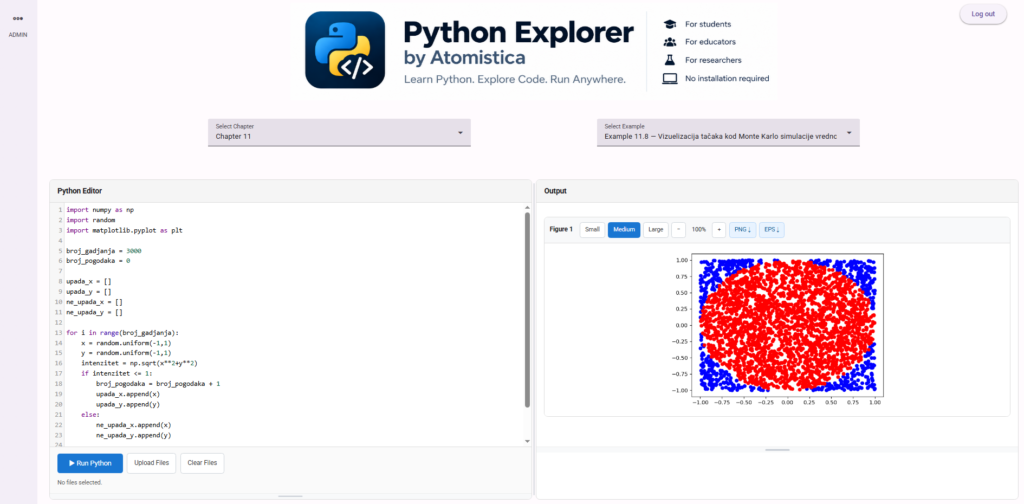
Write and execute Python programs through an intuitive, fully browser-based interface:
Interactive Code Editor – Write and edit Python code with syntax highlighting and automatic indentation.
Browser-Based Execution – Execute Python programs directly in the browser using Pyodide.
Instant Results – View program output, numerical results, and error messages.
Integrated Plotting – Generate and display scientific figures directly within the application.
No Installation Required – Access Python and scientific computing tools without configuring a local development environment.
Scientific Computing and Visualization
Explore essential Python libraries commonly used in science, engineering, and education:
NumPy – Perform numerical calculations, matrix operations, and array-based computations.
Matplotlib – Create scientific plots, visualize mathematical functions, and present computational results.
SciPy (Premium) – Access scientific algorithms for optimization, integration, interpolation, statistics, and numerical analysis.
pandas (Premium) – Process, organize, and analyze structured datasets.
scikit-learn (Premium) – Explore machine learning algorithms for regression, classification, and data analysis.
These libraries provide a foundation for applications ranging from introductory programming exercises to advanced numerical simulations and data-driven research.
Python Examples and Educational Resources
Learn Python programming through ready-to-use examples and practical exercises:
Curated Python Examples – Explore examples covering programming fundamentals, numerical methods, scientific calculations, and visualization.
Organized Example Library – Browse examples grouped by chapters and topics.
Editable Source Code – Load examples into the editor, modify parameters, and immediately observe the results.
Interactive Learning – Experiment with numerical algorithms and visualize how changes in code affect computational outcomes.
Custom Educational Content (Premium) – Educators can upload and organize their own Python examples for students.
Python Explorer is particularly suitable for teaching programming, computational physics, numerical mathematics, and other scientific disciplines where practical coding experience is essential.
Data Handling and File Management (Premium)
Work with external datasets and files directly within the Python environment:
File Upload – Import datasets and supporting files for use in Python programs.
Data Processing – Analyze CSV files, numerical datasets, and other supported data formats.
Generated File Downloads – Save and download files created during program execution.
Scientific Figure Export – Download generated plots in PNG and EPS formats.
Integrated File Management – Manage uploaded and generated files through the application interface.
These capabilities allow users to perform practical data analysis and scientific computing tasks without relying on a locally installed Python environment.
Dedicated Educational Environments (Premium)
Python Explorer Premium is designed to support programming courses, university teaching, and research group activities through dedicated application instances.
Dedicated Application Instance – Each subscription provides an independent Python Explorer environment hosted on an Atomistica subdomain (e.g.,
app123.atomistica.online).User Management – Administrators can manage access for educators, teaching assistants, and students.
Custom Example Library – Upload, edit, organize, and remove Python examples tailored to specific courses.
Supporting Data Files – Attach datasets and other files required for practical exercises.
Administrative Interface – Manage educational content and registered users through a dedicated administration area.
Flexible Classroom Access – Provide students with a consistent programming environment accessible from their own computers.
This approach allows educators to concentrate on teaching scientific programming rather than installing, configuring, and maintaining software on individual student computers.
Community and Premium Versions
Python Explorer offers two versions to accommodate different educational and scientific needs.
Python Explorer Community – Free
The Community version provides an accessible introduction to Python programming and scientific computing:
Free access without registration.
Browser-based Python execution.
NumPy and Matplotlib libraries.
A collection of curated programming examples.
Interactive code editing and scientific visualization.
Python Explorer Premium – Subscription
The Premium version extends the platform with additional capabilities for educational and research applications:
All features of the Community version.
Additional libraries: SciPy, pandas, and scikit-learn.
Upload of external datasets and supporting files.
Download of generated files and scientific figures.
Dedicated application instance on an Atomistica subdomain.
User accounts and administrative controls.
Custom Python example libraries for courses and research groups.
Support for multiple students within a shared educational environment.
Why Python Explorer?
No installation required – Run Python directly in a web browser.
Free Community version – Learn and practice Python programming without registration.
Designed for scientific education – Particularly suitable for physics, chemistry, mathematics, engineering, and data science.
Essential scientific libraries – Access widely used tools for numerical computing, visualization, and data analysis.
Interactive learning – Modify examples, execute programs, and immediately explore the results.
Dedicated educational environments – Provide customized programming platforms for university courses and research groups.
Simple and accessible – An intuitive interface that allows users to focus on programming rather than software configuration.
Part of the Atomistica Explorer Suite – Developed within an expanding ecosystem of scientific and educational tools.